
Rule the Jobsite

One Application Platform for Reporting, Compliance, and Productivity

One app in the field and one in the office to put the power of collective planning and operational job site information into the capable hands of your people

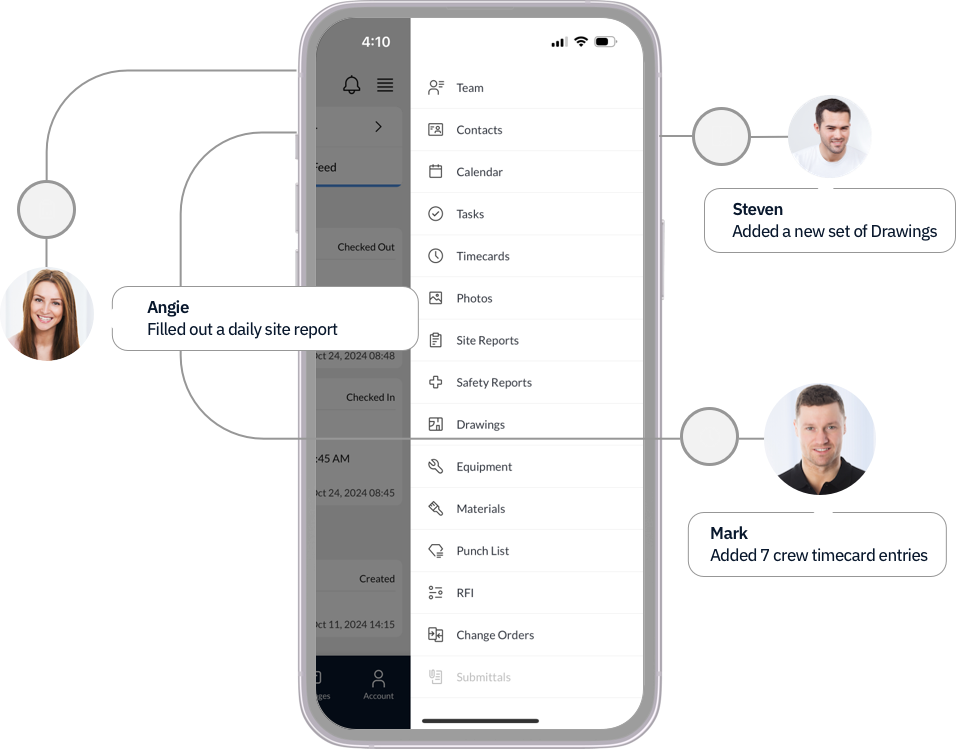
Comprehensive Mobile App
Powered by SMX Platform
SiteMax Mobile App
← Back to SiteMax
Definitive Guide

What Is Construction
Jobsite Tracking?

If your crew is losing hours to paperwork, your office is making decisions on outdated information, or your project records are scattered across apps and text threads: this guide breaks down what Jobsite Tracking is, why it matters, and what it looks like when it works.

SiteMax Systems
February 2026
6 min read
The Definition

What Jobsite Tracking
Actually Means

Jobsite Tracking is the continuous, realtime capture of everything that happens on an active construction site: labor, safety, progress, materials, communication, and cost: connected and accessible the moment it's recorded.

It's the difference between knowing what happened on your jobsite today and reconstructing it from memory at the end of the week. Between having a safety record ready when you need it and scrambling to find a form in a binder. Between a project manager with accurate cost data and one making decisions based on last month's numbers.

Good Jobsite Tracking doesn't add work for the people in the field. It captures what's already happening: clock-ins, daily reports, safety forms, photos, material deliveries: and turns it into a live, searchable record that the whole team can rely on.

Eight Dimensions of JDT. System of Record.

JOBSITE DATA TRACKING
01
People & Labor
Who was on site, when they arrived, and what they worked on. Hours tied to payroll and cost codes, accurate to the minute.
02
Safety
Inspections, forms, and incidents captured digitally and stored permanently in one organized place. Audit-ready always.
03
Progress
Photos, daily reports, task completion, and milestone documentation. A complete, timestamped record of every project.
04
Materials & Equipment
Full visibility into what is on site, ordered, in use, and needed next across every active project.
05
Communication
RFIs, submittals, change orders, and punch lists flowing between field and office without friction or delay.
06
Cost
Purchase orders, time entries, and resource allocation connecting every field activity to the financial health of the project.
07
Document Control
Every drawing, every revision, always current. Decisions never made on outdated information.
08
Smart Data Capture
Powered by Vectorflows: data intake engineered to fit your company's proprietary methods.
The Eight Dimensions

What Gets Tracked on an Active Jobsite

A complete Jobsite Data Tracking system covers eight areas of activity. Most tools handle one or two. When all eight are connected, every team member: from the superintendent on site to the project manager in the office: is working from the same information.

👷
People & Labor
Who is on site, when they arrived, what they're working on, and how their hours connect to payroll and project cost. Accurate to the minute: not reconstructed from memory on Friday afternoon.
🦺
Safety
Every inspection, form, incident, and compliance record: captured digitally, stored permanently, audit-ready always. COR certification without the binders. No gaps when an incident forces a records review.
📸
Progress
Photos, daily reports, task completion, and milestone documentation that creates an undeniable record of the build. The superintendent's two minute report becomes the project's permanent history.
🏗
Materials & Equipment
What's on site, what's been ordered, what's in use, and what's needed next: tracked across every active project. No spreadsheets. No calls to the yard to find out where the excavator is.
📋
Communication
RFIs, submittals, change orders, and punch lists flowing between field and office without friction or delay. The field asks. The office answers. The record lives in one place.
💰
Cost
Purchase orders, time entries, and resource allocation connecting every field activity to the financial health of the project. The project manager pulls a cost report accurate to the hour, not the week.
📁
Document Control
Every drawing, every revision, always current and accessible to the right people on site. Decisions never made on outdated information.
Smart Data Capture
Powered by Vectorflows: structured data intake engineered to fit your company's proprietary methods and cost codes.
Why It Matters

What It Costs When
the Data Doesn't Flow

Most of the problems that slow down construction projects aren't problems with the work itself: they're problems with information. Hours that go unrecorded. Safety incidents with no paper trail. Billing disputes with nothing to back up your position. Cost overruns that nobody saw coming because the field data took three weeks to reach the office.

The field team is doing the work. The problem is that the record of that work doesn't exist: or it exists in five different places that nobody can access at the same time.

"The field works hard. The office makes decisions in the dark. Jobsite Tracking closes that gap."

When Jobsite Tracking is working properly, a superintendent clocks the crew in from their phone at 7am. A daily report gets filed in two minutes before lunch. A safety inspection is completed on a tablet and stored permanently. By the time the project manager sits down in the afternoon, the data from the site is already in the system: not waiting to be entered, not stuck in a text thread, not sitting in someone's notebook.

Choosing the Right Tool

What Makes Jobsite
Tracking Actually Work

The biggest reason Jobsite Tracking fails in practice isn't the software: it's adoption. If the people on the tools won't use it, nothing else matters.

1
It Has to Work in the Field
Bad cell signal. Cold hands. Five minutes between tasks. A workforce that spans every generation and comfort level with technology. A Jobsite Tracking system that isn't fast, simple, and mobile first won't get used: no matter how powerful it is on paper.
2
All Eight Dimensions, Connected
A timecard app won't tell you about a safety gap. A safety platform won't connect to your cost codes. When each dimension of your jobsite lives in a different tool, you still have the same problem: just with more logins. Look for a system where all eight dimensions feed into one record.
3
No Extra Steps for the Crew
The best Jobsite Tracking happens as a natural part of the workday: not as an additional admin task at the end of a shift. Clock-ins, daily reports, safety forms, and photo documentation should all take minutes, not a manual. If the system creates extra work, the crew will stop using it.
How SiteMax Does It

Built for the Field
Since 2014

SiteMax was built on an active commercial jobsite in Vancouver. The problem that started it was simple: the existing tools weren't built for the people doing the actual work. They were too slow, too complicated, and ignored the moment the novelty wore off.

2014
A Vancouver based general contractor needed a better way to get information from the field to the office: without adding paperwork or slowing the crew down. What they built became SiteMax Systems, now used on tens of thousands of jobsites worldwide.

Today SiteMax covers all eight dimensions of Jobsite Data Tracking: timecards, daily reports, safety forms, photos, equipment, RFIs, purchase orders, document control, and punch lists: in one mobile first platform that the whole team can use from day one, without training.

"Software decisions in construction are always difficult. There's such a wide range of people, ages, and experience levels. The older people generally have the most experience but are the least computer savvy. SiteMax was easy to use and pick up. I haven't had anybody in the company yet say it's too complicated."
Greg Gerke: Director of Construction, Townline Homes
See It on
Your Jobsite.

Explore the full SiteMax platform or book a demo to see how Jobsite Tracking works across your active projects.