Construction Safety Management Software Built for the Field
SiteMax replaces paper safety processes with structured digital workflows for inspections, hazard assessments, safety meetings and corrective action tracking, so your teams stay compliant and audit-ready.
Trusted on 150,000+ jobsites.



Everything your safety program needs in one place

Digital safety forms and checklists
Standardize field inspections with forms you can build or upload, and keep every crew working from the same checklist.
Mobile field reporting
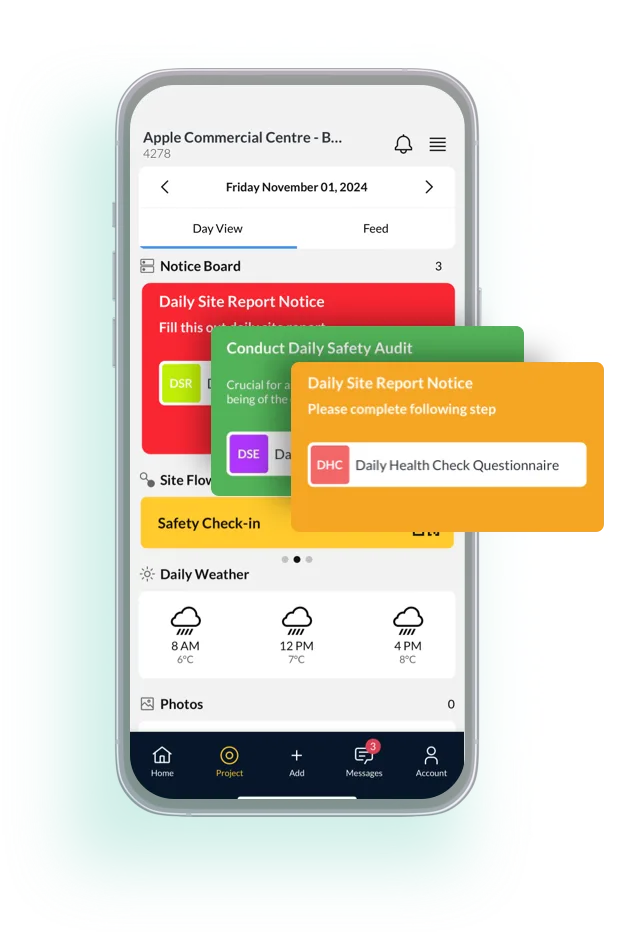
Complete safety forms from the jobsite on any device, without a trip back to the office.
Incident and near-miss reporting
Capture events the moment they happen, so nothing waits until the end of the week to be recorded.
Corrective action tracking
Assign follow-up to the right person and monitor it through to completion.

Compliance documentation
Build a defensible audit trail with records that show who created what, and when.
Audit-ready records and workflows
Keep all data centralized and exportable, and route reports for review and sign-off automatically.
From the field to the audit file in three steps
Choose or build the form
Pick a safety form from your library, or build and upload your own.
Complete it on site
Crews fill it out on a phone or tablet, and the record is saved with its date and author.
Review, sign off and export
Supervisors approve, corrective actions are assigned, and reports export for audits.
Why contractors are replacing paper safety forms
Paper forms are familiar, but they create gaps that digital safety software closes. Here is how the two approaches compare in day-to-day use.
Paper safety forms
Forms are filled in by hand, carried back to the office and filed. They can be lost, completed late or hard to read, and finding one record means searching through folders. Preparing for an audit often means collecting paperwork from several jobsites by hand.
SiteMax Safety
Forms are completed on site and saved the moment they are submitted. Each record shows who created it and when, corrective actions can be assigned to the right person, and reports can be exported when compliance documentation is needed.
Lower risk, stronger compliance, faster reporting
Reduced risk exposure
Hazards and near misses are recorded and followed up while they are still fresh.
Stronger compliance posture
Certifications, inspections and meetings live in one organized record.
Faster safety reporting
Reports are created at the point of work instead of being retyped from paper.
What is construction safety management software?
Construction safety management software is a digital platform that helps contractors run their safety program from the jobsite. Instead of paper checklists and scattered spreadsheets, teams complete inspections, hazard assessments, toolbox talks and incident reports on a phone, tablet or computer, and every record is stored in one place.
The goal is simple: make safety documentation accurate, timely and easy to find. When a supervisor needs yesterday's inspection, or an auditor asks for a record from last quarter, the answer is a search away rather than a trip through a filing cabinet.
Safety documentation must be accurate, timely and accessible
Paper safety forms get lost, filled in late and are hard to find when an auditor asks for them. Digital construction safety software gives every inspection, hazard assessment and incident report a single, searchable home that the whole team can reach from the jobsite.
With SiteMax Safety, crews complete forms on a phone, tablet or computer, supervisors review and sign off, and safety managers export records when compliance documentation is needed.
Safety software for construction teams of every size
Construction teams of 5 to 1,000
Keep every jobsite on the same safety process without buying heavy project management software. Streamlined coordination means fewer missed forms and fewer miscommunications between the field and the office.
Contracting teams of 5 to 100
Manage field safety, labor and paperwork in one place instead of juggling several apps. Crews get simple mobile forms, and office staff get records they can review and export.
Self-performing teams
Lightweight, flexible tools suit in-house crews who do the work themselves. Greater visibility into jobsite activity keeps key stakeholders informed and accountable.
What to look for in construction safety software
Not every safety app fits every contractor. When comparing options, these are the questions that matter most on a real jobsite.
Is it easy for crews to use in the field?
If a form takes too long to fill in on a phone, crews will skip it. Look for mobile-friendly forms that work on the devices your team already carries.
Can you build forms around your own procedures?
Every company has its own checklists. The best tools let you build or upload your own forms rather than forcing you into a fixed template.
Does it help you follow through on findings?
An inspection only reduces risk if problems get fixed. Corrective action tracking and review workflows turn a recorded finding into a closed item.
Will the records stand up to an audit?
Choose software that keeps a clear audit trail and lets you export reports for compliance documentation, so audit preparation does not become a scramble.
Does it connect to the rest of the project?
Safety rarely stands alone. Software that also covers forms, equipment, documents and subcontractor activity saves your team from switching between apps and passwords.
Connect safety to the work happening on site
"The greatest success we've achieved with SiteMax is our COR certification. Being able to develop, implement, manage, and track our Health & Safety documentation digitally has had a profound impact, and we've improved results year over year."
 Will WrightManager of Field Operations, Fusion Projects
Construction safety software questions
What is construction safety software?
Construction safety software is a digital platform for running a jobsite safety program. Crews complete inspections, hazard assessments, toolbox talks and incident reports on a phone, tablet or computer instead of paper. Each record is saved with its date and author, stored in one place and easy to find when a supervisor or auditor asks for it.
Can I build my own safety forms in SiteMax?
Yes. SiteMax includes 12+ built-in safety report types, such as Incident, Hazard, Inspection, Risk Assessment, PPE Compliance and First Aid reports. If your program needs something else, use the Custom Form Builder to create a form with your own field names, or upload an existing form. Once built, it is available on every project.
How are corrective actions tracked?
When an inspection or report turns up a problem, you assign the follow-up to the right person in SiteMax. Each corrective action is tied to a user, a date and a time. Managers can see what has been completed, what is still outstanding and who is responsible, so findings get closed instead of forgotten.
What is a near-miss report?
A near-miss report records an event that could have caused an injury or damage but did not. Reporting near misses helps you spot hazards before someone gets hurt. In SiteMax, crews can capture incidents and near misses from the jobsite the moment they happen, with notes and photos, so the record does not wait until the end of the week.
Why replace paper safety forms with digital forms?
Paper forms get lost, filled in late or written illegibly, and they are slow to search when an auditor asks for them. Digital forms are completed at the point of work, saved the moment they are submitted and stored in one searchable place. Crews can also add photos and signatures, so the evidence sits on the same record.
What should I look for in construction safety software?
Start with ease of use, because crews skip forms that are slow to fill in on a phone. Then check that you can build forms around your own procedures, track corrective actions to completion and export records for audits. Finally, look for software that also covers forms, documents, equipment and subcontractor activity, so your team uses one platform.
Can I export safety records for an audit?
Yes. Safety records in SiteMax are centralized, date-stamped and searchable, and you can export them when compliance documentation is needed. That makes it easier to pull together inspection records, training logs and incident reports for an audit or a COR review, instead of assembling binders by hand.