Construction Job Costing Software That Ties Field Costs to Your Cost Codes
SiteMax connects labor hours, equipment time, materials and purchase orders to your cost codes as the work happens, so job costs come from the field, not from re-keyed paperwork.
Trusted on 150,000+ jobsites.
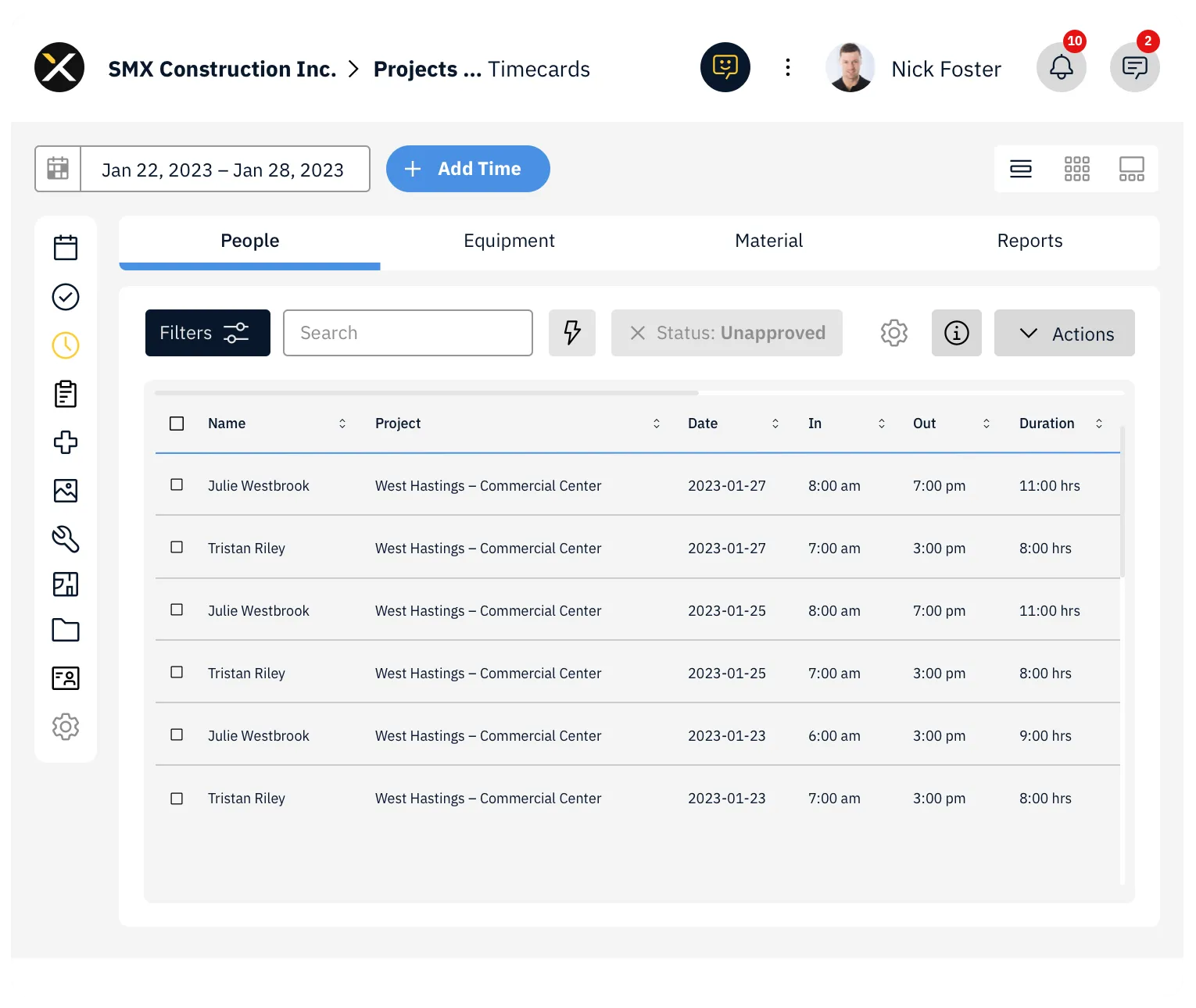


Everything that feeds your job costs, coded at the source
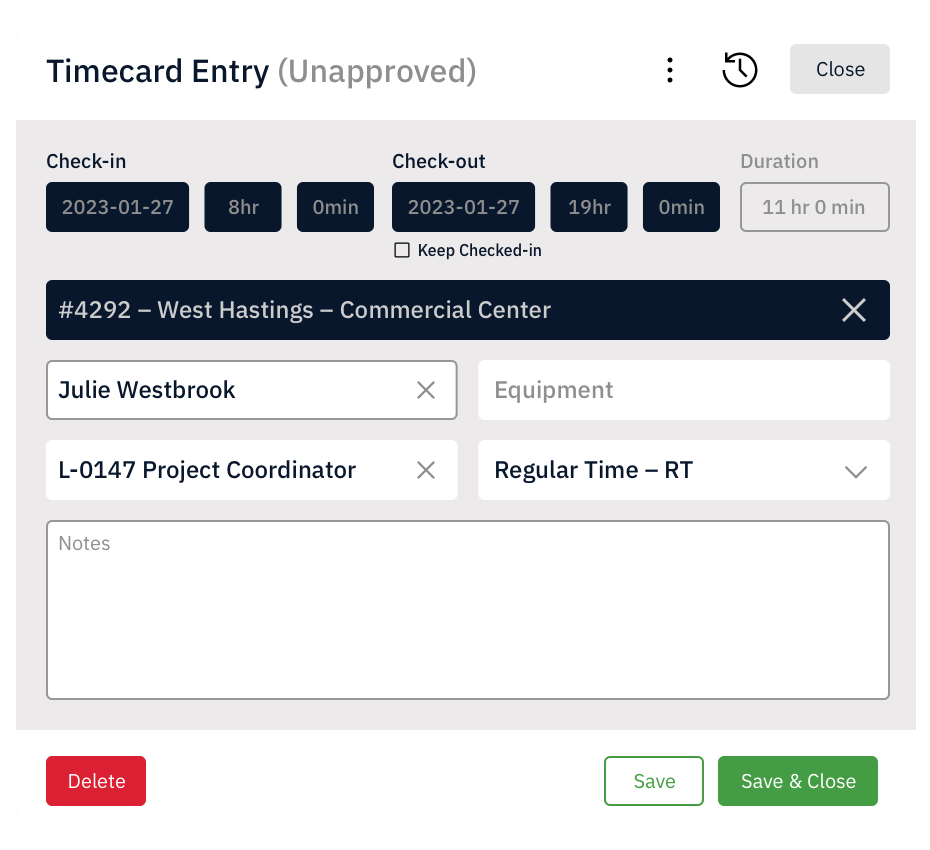
Cost code allocation on timecards
Crews and supervisors allocate hours to a project and cost code as they log time. Allocate by phase, task or activity.
Consistent cost code lists
Field entries reference your organization's pre-configured cost code list, so codes are not mistyped or duplicated.

Purchase orders tied to cost codes
Raise POs from the field or office, tied to your project cost structure. Committed costs are visible the moment a PO is issued. (Add-on.)
Equipment and material costs
Log equipment time on its own timecard or with a worker's entry, and record material usage. Set cost type codes for labor, equipment and materials.

Financial calculations
Define payable items, billable items and overhead by combining time type, classification, work type and cost code. Set rates or multipliers for each.
Exports for accounting
Push processed time entries to QuickBooks Online, or export reports filtered by cost code as CSV, XLSX or PDF.
From field entry to job cost in three steps
Set up your cost codes
Load your cost code list, cost type codes and any rates or multipliers once.
Code costs in the field
Crews allocate hours, equipment time and purchase orders to cost codes as the work happens.
Review and export
Approve entries, review job costs by cost code and export to QuickBooks Online or your accounting system.
Why contractors are moving job costing out of spreadsheets
Spreadsheets track costs only after someone codes the data by hand. Here is how the two approaches compare.
Spreadsheets and paper
Hours come in on paper timesheets and purchases arrive as emails or invoices. The office codes each one after the fact, and committed costs are not visible until billed.
SiteMax Job Costing
Hours, equipment time and purchase orders are coded in the field from your own cost code list. POs show committed costs when issued, and approved data exports for payroll and accounting without re-keying.
Current costs, fewer surprises, less re-keying
Improved job cost tracking
Costs are coded where they happen, so reports reflect where time and money actually went.
No surprise costs
Purchase orders show committed costs the moment they are issued, not when the invoice arrives.
Fewer manual entries in accounting
Coded, approved data exports for payroll and job costing instead of being retyped.
What is construction job costing software?
Construction job costing software tracks what each project costs by tying labor, equipment, materials and purchases to cost codes. Costs are coded when they are recorded, not rebuilt from paperwork later.
In SiteMax, cost codes are part of everyday field work. Crews allocate hours to cost codes on their timecards, and purchase orders are tied to cost codes when they are raised. That data feeds real-time job cost visibility for each project, and the SiteMax budget dashboard compares it with each project's budget.
Job costs are only as good as the field data behind them
When hours are on paper and purchases are made by phone or email, costs reach the office late and uncoded. Committed costs stay invisible until an invoice arrives.
With SiteMax, cost codes are selected in the field from your own pre-configured list. Hours, equipment time and purchase orders arrive coded, approved and ready to export for payroll and job costing.
Job costing for construction teams of every size
Construction teams of 5 to 1,000
Keep cost coding consistent across every project and crew.
Contracting teams of 5 to 100
Track labor, equipment and purchases against cost codes in one place, without recoding timesheets by hand.
Self-performing teams
Code in-house crew hours and purchases to your own cost structure as work progresses.
What to look for in construction job costing software
These questions help you judge whether a job costing tool will give you accurate cost data.
Are costs coded in the field?
Coding after the fact relies on memory. Look for cost code allocation at the point of entry, on timecards and purchase orders.
Does it cover more than labor?
Labor is only part of job cost. Check that equipment time, materials and purchase orders can be coded too.
Are cost codes consistent?
Free-text codes lead to typos and duplicates. Look for a single, pre-configured cost code list.
Can you see committed costs early?
A purchase order is a cost before it is an invoice. Look for POs that show committed costs when issued.
Does it connect to accounting?
Check for a direct push or exports your accounting and payroll systems can use, so data is not re-keyed.
Connect job costs to the work on site
"SiteMax has enabled massive efficiencies with everything in one app. This platform has saved us 2.5 hours of processing time each time we process timecards to payroll."
 Anderson MazuchelliPacific Earthworks
Construction job costing questions
What is construction job costing software?
It is software that tracks what each project costs by tying labor, equipment, materials and purchases to cost codes. Instead of piecing costs together from timesheets and invoices later, costs are coded as they are recorded. That gives you a more current view of each job.
How does SiteMax track job costs?
SiteMax ties field activity to your cost codes. Crews allocate hours to cost codes on their timecards, equipment time and material usage are logged in the same system, and purchase orders are tied to cost codes when raised. Together, these connect field activity to real-time job cost visibility, and the budget dashboard shows committed and actual costs against each project's budget.
Can I use my own cost codes in SiteMax?
Yes. SiteMax works from your organization's pre-configured cost code list, so codes selected in the field match your own structure. You can also customize cost type codes for labor, equipment and materials to match your accounting software. Lunch deductions can be assigned to a dedicated cost code for clean reporting.
Do purchase orders show up in job costs?
Yes, with the Purchase Orders add-on. POs can be created in the field or office and are tied directly to cost codes. Committed costs are visible the moment a PO is issued, so you are not waiting for the invoice. POs can be routed for approval and exported as structured data for your accounting team.
Does SiteMax integrate with accounting software?
Approved and processed time entries push directly to QuickBooks Online. SiteMax also exports data in formats compatible with the accounting and ERP systems contractors use for payroll, job costing and financial reporting. Time reports export as CSV, XLSX or PDF.
Why code costs in the field instead of in the office?
The people doing the work know which task their hours or purchases belong to. Coding in the field captures that while it is fresh, from a consistent cost code list. Coding later in the office depends on memory and re-keying, which adds errors and delay.