Upload, Share, and
Control Every Document,
From Contract to Closeout.
Construction projects generate thousands of files. SiteMax File Management gives you a centralized, version-controlled document system with granular access controls, drag-and-drop uploads, and sharing that works from the office and the field.
"Where Is the Latest
Version of That File?"
Your project documents are scattered across Dropbox folders, email attachments, USB drives, and someone's desktop. Nobody's sure which version of the contract is current. The subtrade says they never received the updated spec.
And when you need to pull compliance docs for an audit, you're spending a full day just tracking files down.
Every Project File
in One Organized System.
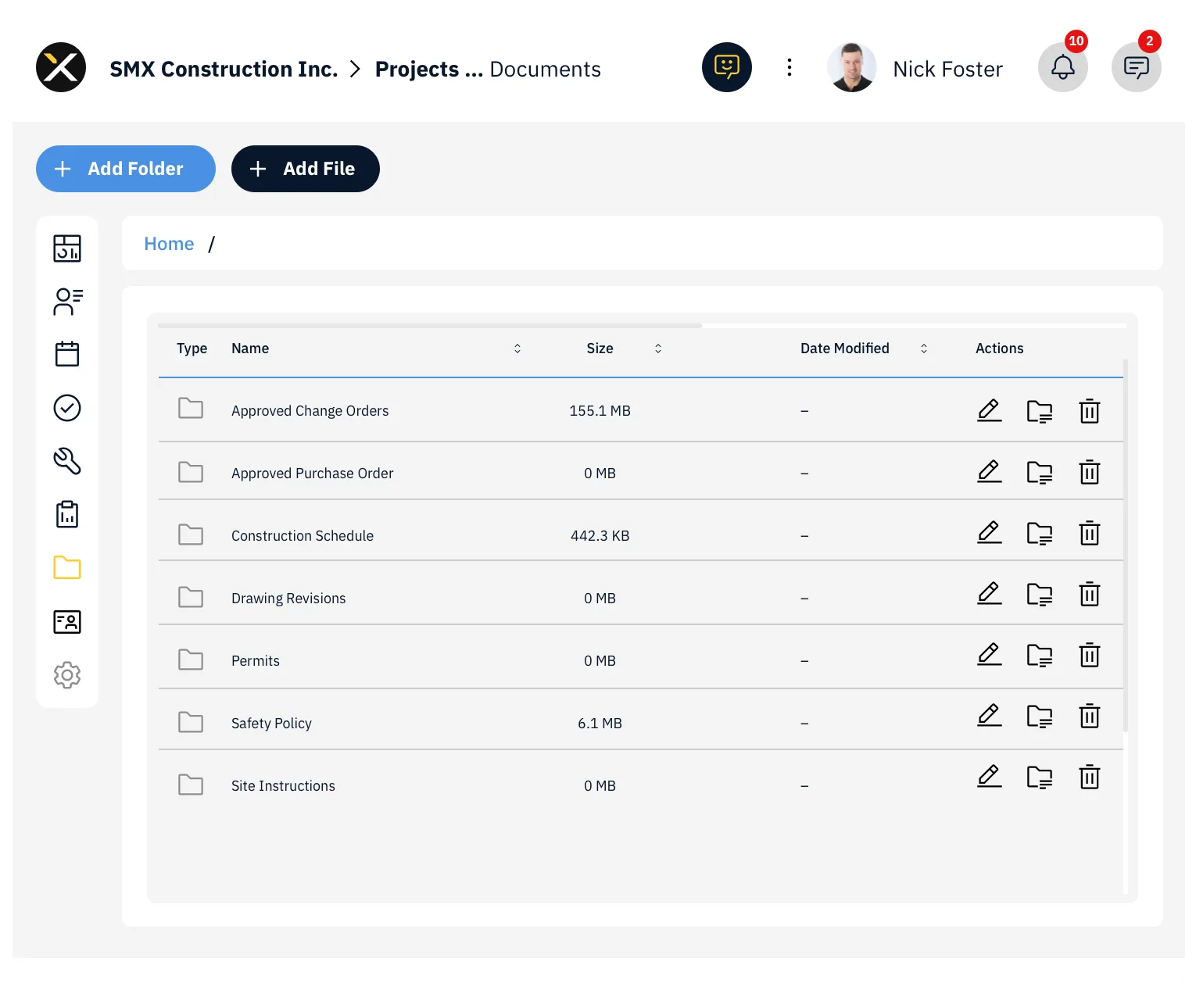
SiteMax File Management brings every project and company document into a single, organized system. Upload files and folders with drag-and-drop, share them with internal teams or external contacts, track every version, and control exactly who can view, edit, or manage each file.
It's the document system construction teams actually need, fast to use, easy to organize, and accessible from any device.
A Document System
Built for Construction.
Stop toggling between shared drives, email, and cloud storage. SiteMax gives you a centralized Documents module at both the company and project level. Upload contracts, specs, compliance docs, safety manuals, drawings, photos, everything your team needs, accessible from one location.
When you upload a file with the same name as an existing one, SiteMax prompts you to save it as a new revision. View the full version history, set any previous version as the latest, or delete outdated versions. Ideal for contracts, drawings, and compliance documents where working from the wrong version can mean real consequences.
Share entire folders or individual files via email or text, directly from the Documents module. Internal users get assigned access levels (Viewer, Editor, or Manager). External contacts receive a secure view-only link, no SiteMax account needed.
Not everyone should see everything. SiteMax lets you restrict access at the file or folder level. Sharing a folder shares its contents, but individual files or subfolders within can be restricted separately. You control who sees what.
Every file and folder includes a history log, who uploaded it, who updated it, who moved it, and when. When accountability matters, your document trail is complete.
Deleted files go to a Trash bin where they can be restored. Only a deliberate "Delete Forever" or "Empty Bin" action permanently removes files. Peace of mind for busy teams moving fast.
Everything You Need
to Run Project Documents.
Upload files and entire folders by dragging them directly into your Project or Company Documents. Click to upload individual files, or drop a folder structure and it uploads intact.
Start typing a file name in the Search bar for instant results. Use the filter button to narrow by Type, Created By, Modified By, Last Modified, and more. Choose "AND" to narrow or "OR" to broaden your search.
The Documents module uses a tree structure. Create folders and subfolders to organize files logically. Navigate your file tree just like a desktop file system.
Move files between folders using the Actions button (for bulk moves) or the three-dot menu (for individual files). Copy files to duplicate them into another folder without removing the original.
Select multiple files, click Actions, and choose "Download as Zip" to get everything in a single compressed file. Fast and convenient for sharing offline or archiving.
Three access levels for shared recipients:
- Viewer: Can only view the file or folder
- Editor: Can move the file or folder and upload revisions
- Manager: Can delete the file or folder and manage access settings
Share with internal users by searching their name and assigning an access level. Share with external contacts via the "Share by Link" tab, enter their email or phone number for secure view-only access.
By default, only the original uploader and users with Documents - Manage permissions can control sharing. The document tree structure means sharing a folder shares everything inside it, but you can restrict individual files or subfolders within.
Stop sharing with any user at any time by clicking the "X" next to their name, or click "Stop Sharing" to revoke access for everyone at once.
Upload a file with the same name to be prompted to save as a new revision. View version history from the three-dot menu. Set any previous version as the latest. Delete outdated versions permanently. The current version is always marked with a checkmark under "Is Latest."
Delete files from the three-dot menu. Deleted files go to a Trash bin accessible from the folder icon in the left-hand menu. From the Deleted Files view:
- Restore a file by selecting it and clicking Restore
- Permanently remove a file with Delete Forever
- Clear everything with Empty Bin (irreversible)
Every file and folder maintains a complete activity log, uploads, version updates, and moves are all recorded with timestamps and user names. Access history from the three-dot menu at any time.
Access, manage, and share documents directly from the field using the SiteMax mobile app. Your field teams can pull up specs, safety docs, or contracts without heading back to the trailer.
Company Documents permissions:
- View: See all public files
- Create: Upload files and folders
- Edit: Rename and move files or folders
- Manage: Delete files and folders
Project Documents follow the same structure with project-level permissions. Apply individually or through Permission Templates.
SiteMax is building automatic backups for key modules like Submittals, RFIs, and Form PDFs. Soon, all critical project files across different modules, from inspections and reports to drawings and submittals, will be automatically backed up and securely stored within the File Management system. One place for everything.
Built for Every Role
That Touches Project Files.
Who need a reliable document system that the entire project team can access.
Who want version control and audit trails without the complexity of enterprise document management.
Who spend too much time tracking down files, managing access, and fielding "where's that document?" requests.
Who need instant access to specs, safety docs, and project files from the jobsite.
Under Control.
See how SiteMax File Management brings order to your documents with version control, access management, and field-ready mobile access. Book a personalized demo with our team.