Manage Every Drawing
Version Across Every
Project, From Office to Field.
Outdated drawings cause costly rework. SiteMax keeps your entire team working from the latest revisions with centralized drawing management, instant version notifications, and powerful filtering, accessible from any device.
When Drawings Live Everywhere,
Mistakes Live in the Field.
When your drawing set lives across shared drives, email chains, and plan rooms, your team wastes time hunting for the right version, and sometimes builds from the wrong one. A single outdated drawing on a jobsite can mean thousands in rework, schedule delays, and strained client relationships.
A Single Source of Truth
for Every Drawing
on Every Project.
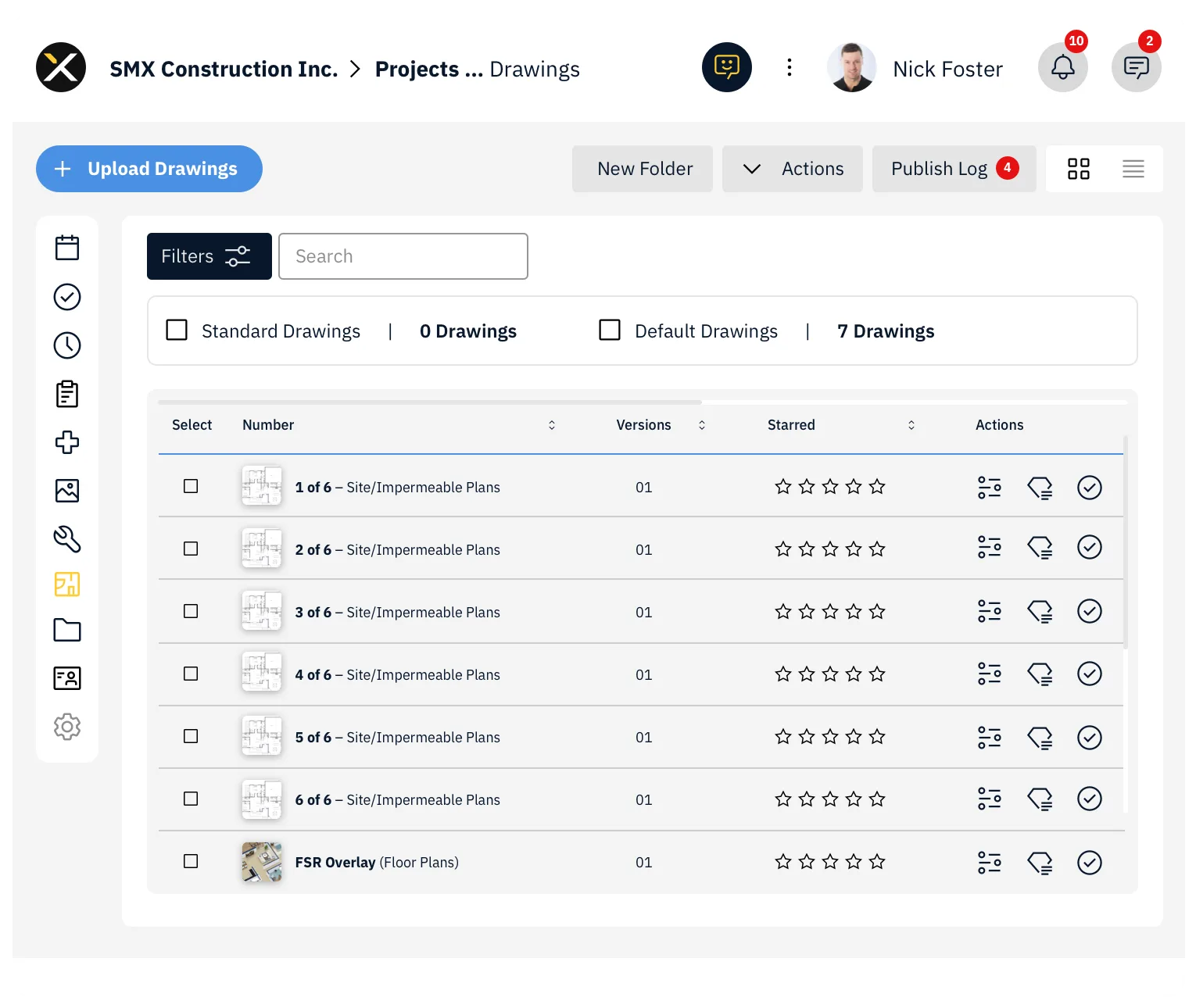
SiteMax Drawings gives you a single source of truth for every drawing on every project. Upload, organize, tag, version, and share your entire drawing set from one centralized module.
Your office team manages revisions while your field crews access the latest versions instantly, on any device, from anywhere.
Built Around How Drawings
Actually Move Through a Project.
Upload new drawing versions and your team is automatically working from the latest set. No more wondering which revision is current or whether the field has the right sheets.
When you upload a new revision, notify your team with one click. Select exactly who needs to know, project managers, site supervisors, subtrades, and they'll receive an alert immediately.
Filter by version, tags, or use header sorting to organize by associated RFIs, Punch Items, Tasks, Change Orders, Photos, or Documents. Save your filter views and come back to them anytime.
Your crews can view drawings on mobile right from the jobsite. Share drawings as PDFs via messaging, email, or any mobile app, no printer required.
Drawings don't exist in isolation. SiteMax connects them to your Punch Items, RFIs, Change Orders, and Tasks so you always have full context when reviewing a sheet.
Pin RFIs, Photos, Tasks,
and Punch Items
Right on the Sheet.
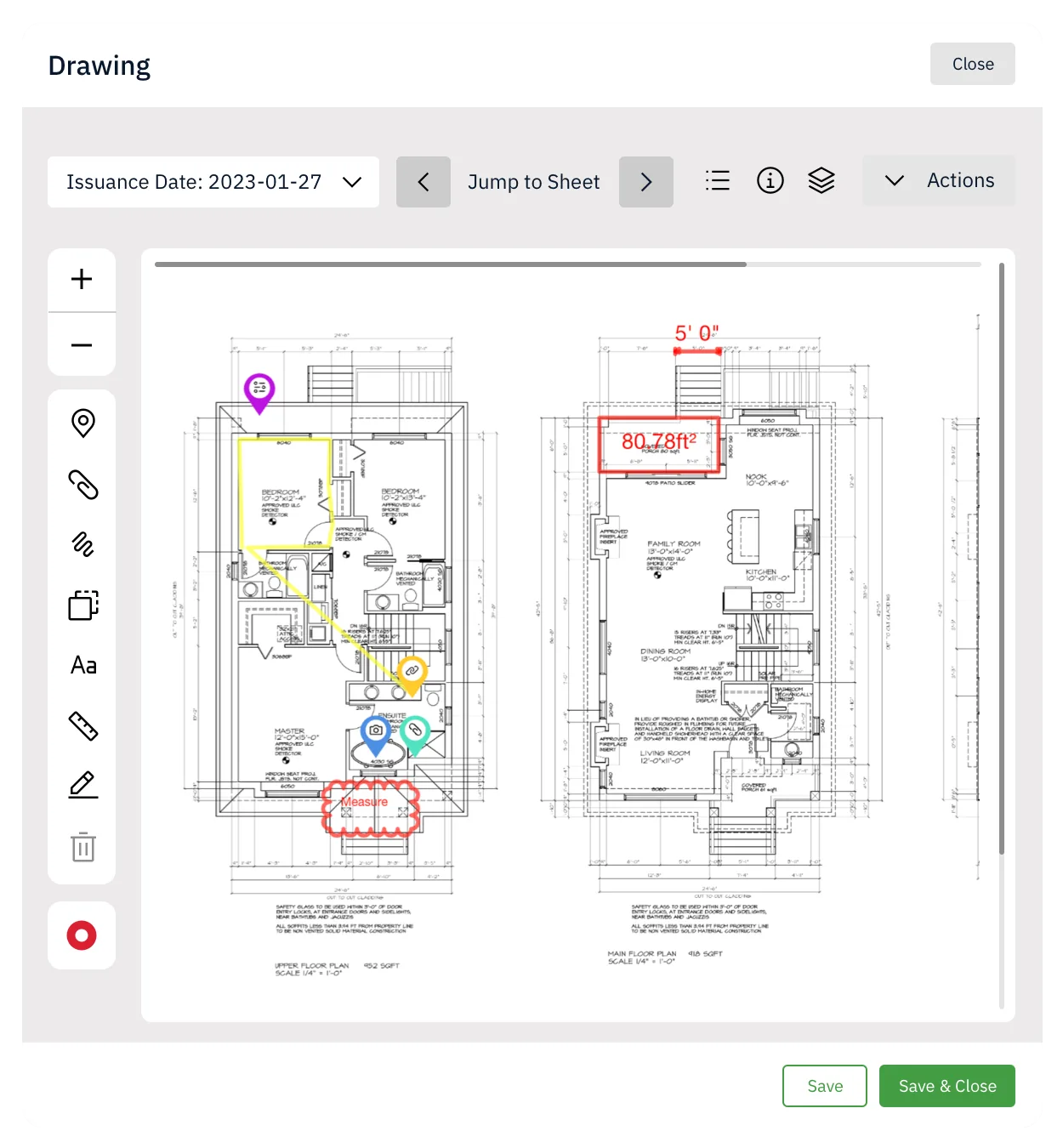
Anything captured in SiteMax can be linked to a precise location on a drawing. Pin an RFI to the column it's about. Pin a photo to the wall it documents. Pin a punch item to the deficient area, with its responsible party already attached.
When the next person opens that sheet, the context comes with it. No hunting through the project log to figure out what happened on grid line C-5.
Everything You Need
to Run Drawings at Scale.
Access all project drawings from the sidebar menu. View Starred Drawings you've marked as important, browse Default Drawings for the full set, or navigate through Drawing Folders for organized access.
Switch between List View and Tile View depending on your preference. Use "Jump to Sheet" to navigate between drawings without leaving the page.
Filter by version and tags to isolate exactly the drawings you need. Use the Actions menu to Bulk Edit, Delete, Export, or Move drawings to folders. Star important drawings in Tile View for quick access.
Three flexible export methods:
- Download individually or download all selected drawings at once
- Copy a shareable URL for direct access, no SiteMax account needed
- Email drawing links directly to Contacts and Users for sets of 4 or more
Customize the exported PDF before sharing.
Add tags to any drawing for easy categorization and filtering. Type any word or phrase, press Enter, and the tag is saved. Add multiple tags per drawing. Tags enhance filtering, reporting, and cross-project organization.
List View: Sort numerically or alphabetically. Use header sorting to organize by Starred status, Tags, RFIs, Punch Items, Tasks, Change Orders, associated Drawings, URLs, Photos, or Documents.
Grid View: See thumbnail previews of every drawing with mark-up icons and counts for quick identification.
Tip: For clean numerical sorting (1, 2, 3 instead of 1, 10, 11), rename single-digit drawings as "01", "02", "03", etc.
Switch between drawing versions at any time. When uploading revisions, notify selected team members directly from the drawing screen using the info icon.
Granular permissions ensure the right level of access:
- View permissions to access the Drawings module
- Edit or Manage permissions to manage drawings
- Edit permissions required to add tags
Apply individually or through Permission Templates.
Built for Every Role
That Touches the Drawing Set.
Managing large drawing sets across multiple trades and revisions.
Who need confidence that every team member is working from current drawings.
Who want a reliable distribution channel for revisions.
Who need instant field access to the latest sheets.
Outdated Drawings.
See how SiteMax keeps your entire team, office and field, working from the same current set. Book a personalized demo with our team.