Construction Management Software Built for the Jobsite
SiteMax is construction management software for contractors in the US and Canada that runs the build, from the first day on site to handover. Site management and project management live in one platform, on the same live field data: daily reports, safety, timecards and equipment on site, and schedules, budgets, RFIs and drawings in the office.
Trusted on 150,000+ jobsites.
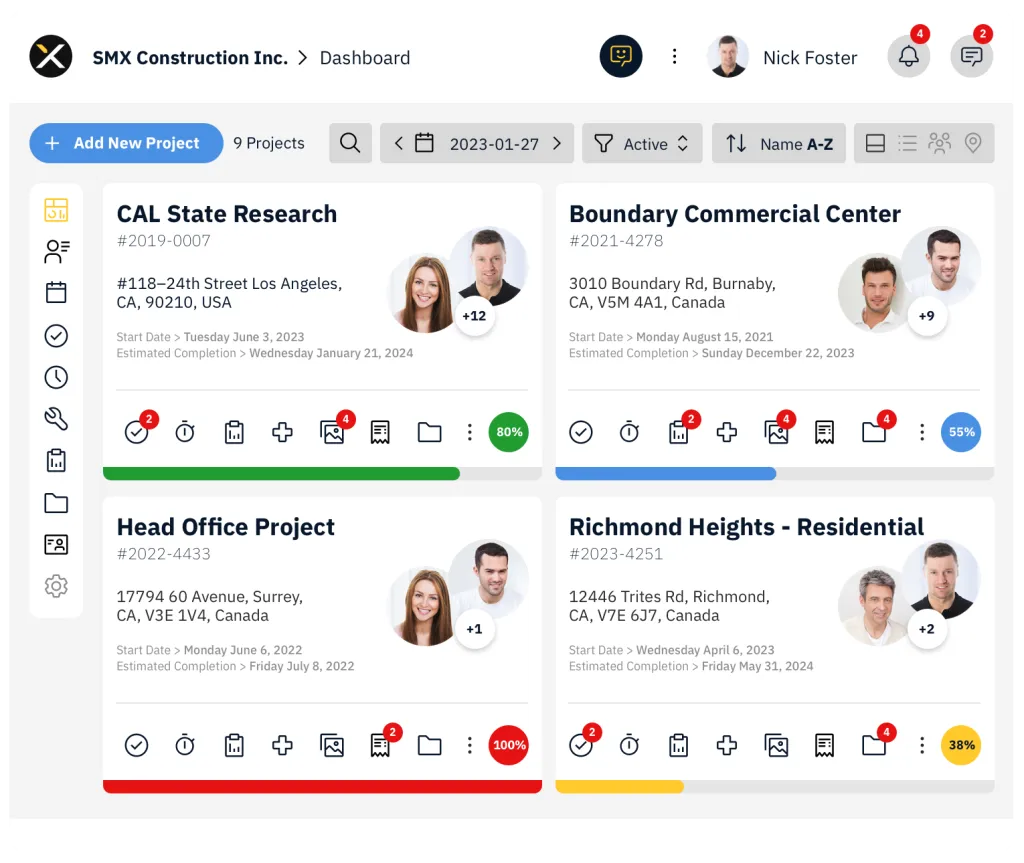
Project dashboard: Riverside Tower
- Daily report submitted Today
- Safety inspection Passed
- Open RFIs 3 due
- Timecards awaiting approval 12
- Punch items closed 48 / 60

Over a Decade of Building
Best-in-Class Jobsite Operations.
For more than 10 years, the most demanding teams in construction, industrial, and resource industries have trusted SiteMax to track what matters most on the toughest sites on earth.







What Is Construction Management Software?
Construction management software is a platform contractors use to plan, track and document projects from the office and the field. Some platforms also cover preconstruction, such as estimating and takeoffs. SiteMax focuses on the build itself: site management and project management in one mobile-first system, so the crew and the office work from the same live record of every project.
Office Jobsite
Who it is for
General contractors, specialty contractors and self-performing teams.

What it replaces
Separate apps, paper forms, spreadsheets and email threads.
Where it works
Phone, tablet and desktop, with documents available offline.

Where it fits
From mobilization to closeout. Keep your estimating and takeoff tools for preconstruction.
Site Management and Project Management, in One Platform
SiteMax started on the jobsite with the site reports crews fill in every day. Everything the project team needs is built on that same field data, so nothing is retyped between the site and the office.
Site management
- Daily reports with weather, photos and manpower
- Safety inspections, toolbox talks and incidents
- Timecards and equipment tracking
- Forms, photos and SiteFlow for subcontractors


Project management
- Critical-path scheduling and live budgets New
- Drawings, documents and punch lists
- RFIs, submittals and purchase orders
- Job costing tied to your cost codes
Where SiteMax fits: keep your estimating and takeoff tools for preconstruction. SiteMax takes over when the job starts, and connects to QuickBooks Online and your accounting exports.
Your Site Office in Your Pocket
One app for the whole company and every project. Flip between the company view your managers use and the project view your crews work in on site.
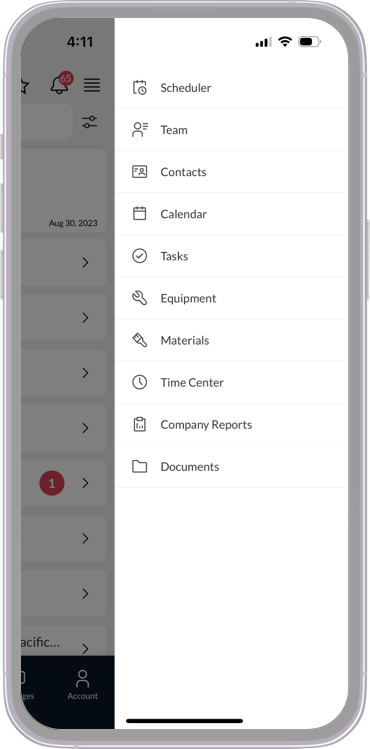 12345678910
Scheduler1
Book appointments and see who is available.
2Team
Crews, roles and permissions in one roster.
Contacts3
Subs, suppliers and clients, shared company-wide.
4Calendar
Every project's key dates on one calendar.
Tasks5
Assign and track work across all your jobs.
6Equipment
Locate, inspect and service your whole fleet.
Materials7
One materials library for every project.
8Time Center
Approve hours company-wide, ready for payroll.
Company Reports9
Filter and export reports across projects.
10Documents
Company files with permission-based access.
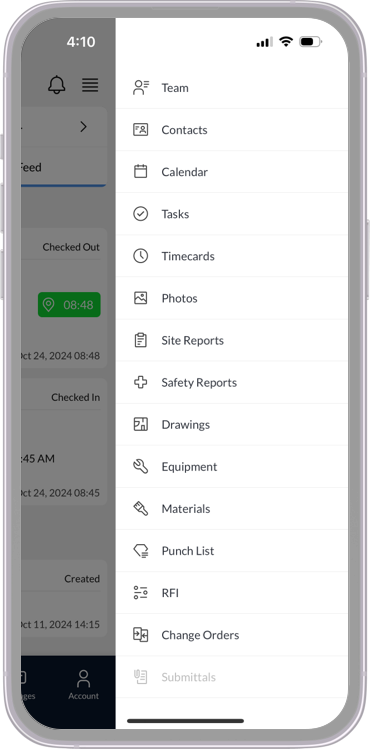 123456789101112131415
Team1
Who's on this job, and their role.
2Contacts
Project contacts one tap away.
Calendar3
The project's upcoming dates.
4Tasks
Today's work, assigned by phase.
Timecards5
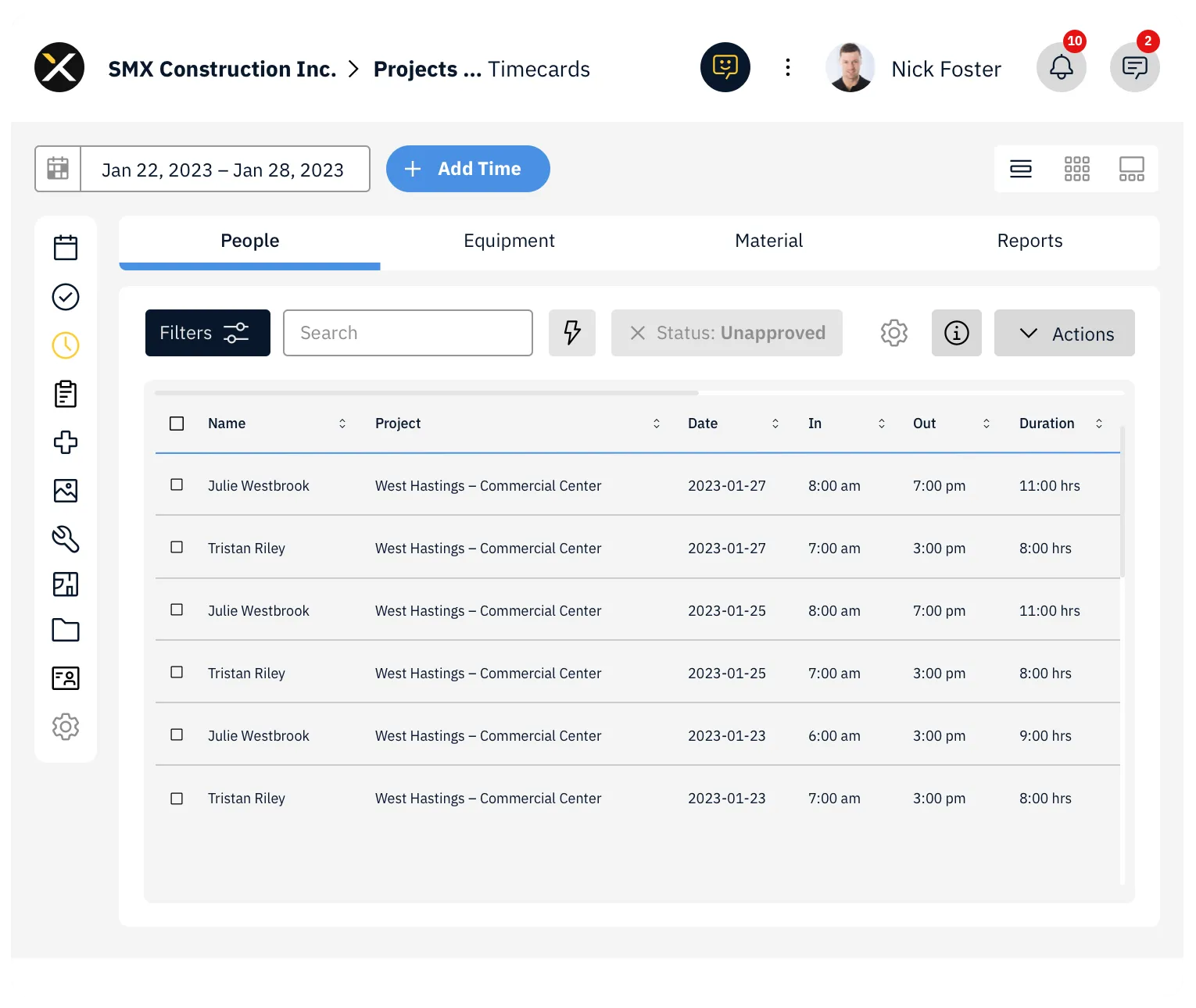
Check in and log hours on site.
6Photos
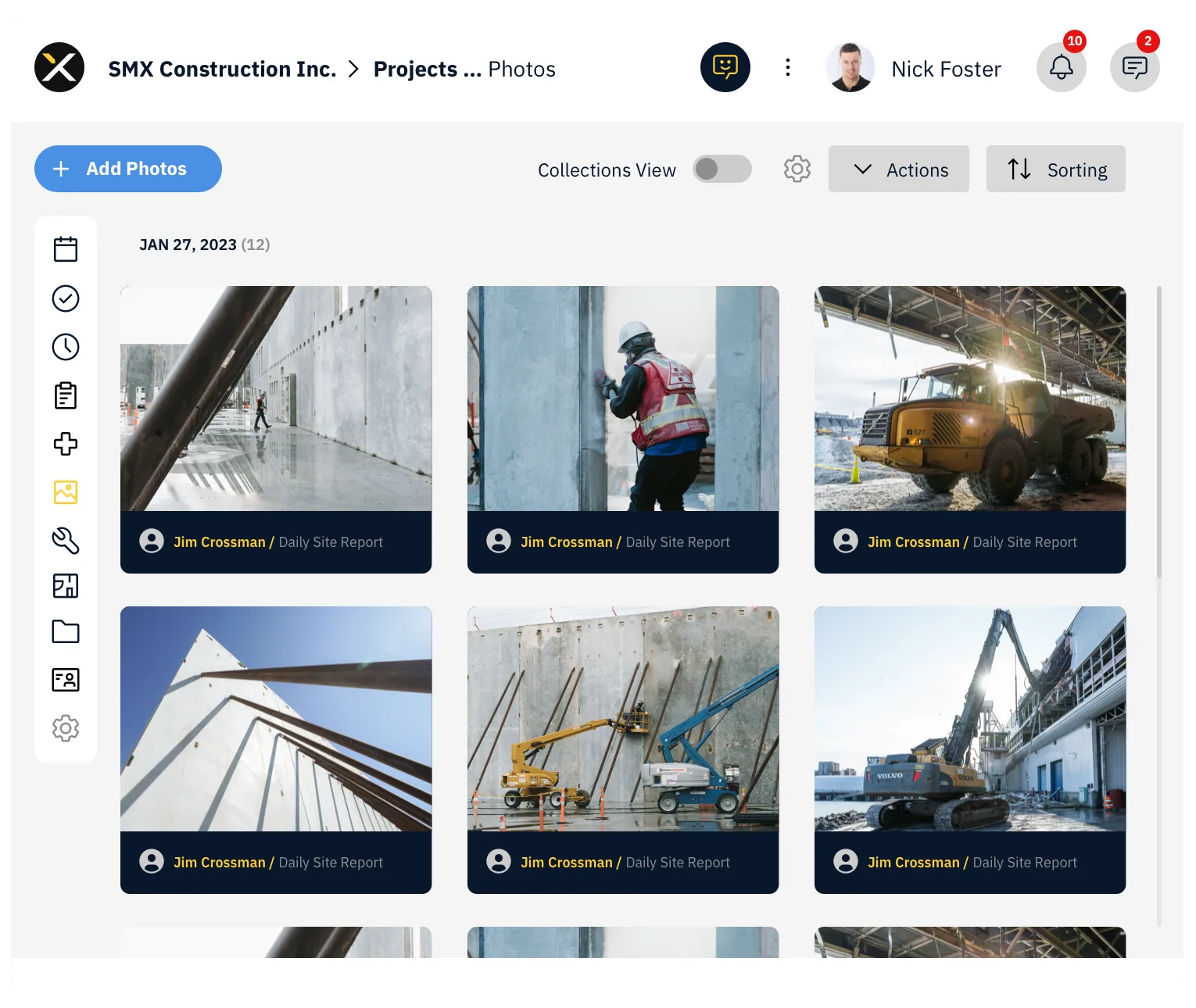
Capture and organize jobsite photos.
Site Reports7
Daily reports with weather and manpower.
8Safety Reports
Inspections and incidents from the field.
Drawings9
The current set, with markups.
10Equipment
Log equipment use and pre-start checks.
Materials11
Record material usage on the job.
12Punch List
Deficiencies with photos and locations.
RFI13
Raise and track RFIs from site.
14Change Orders
Track changes and their approvals.
Submittals15
Shop drawings and approvals.
Site Reports Your Crews Actually Fill In
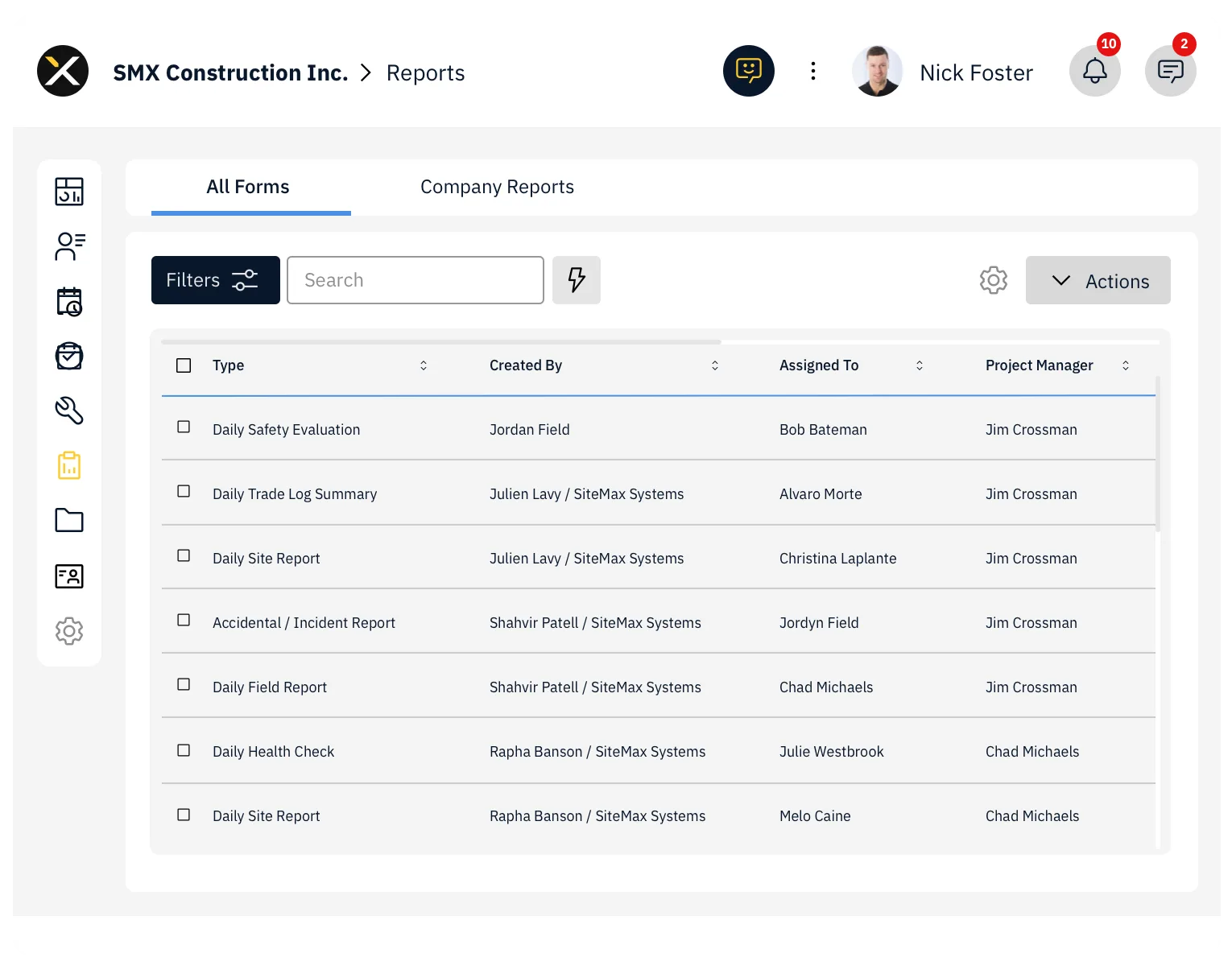
This is where SiteMax started. Daily reports, safety forms and timecards are quick to complete on a phone, so the field records what happened and the office sees it the same day.
- Daily reports with weather, photos, manpower and work progress
- Safety inspections, toolbox talks and incident reports
- Timecards with cost codes, approved in the office
- Every form searchable and exportable for audits

The Current Drawing Set, in Every Hand on Site
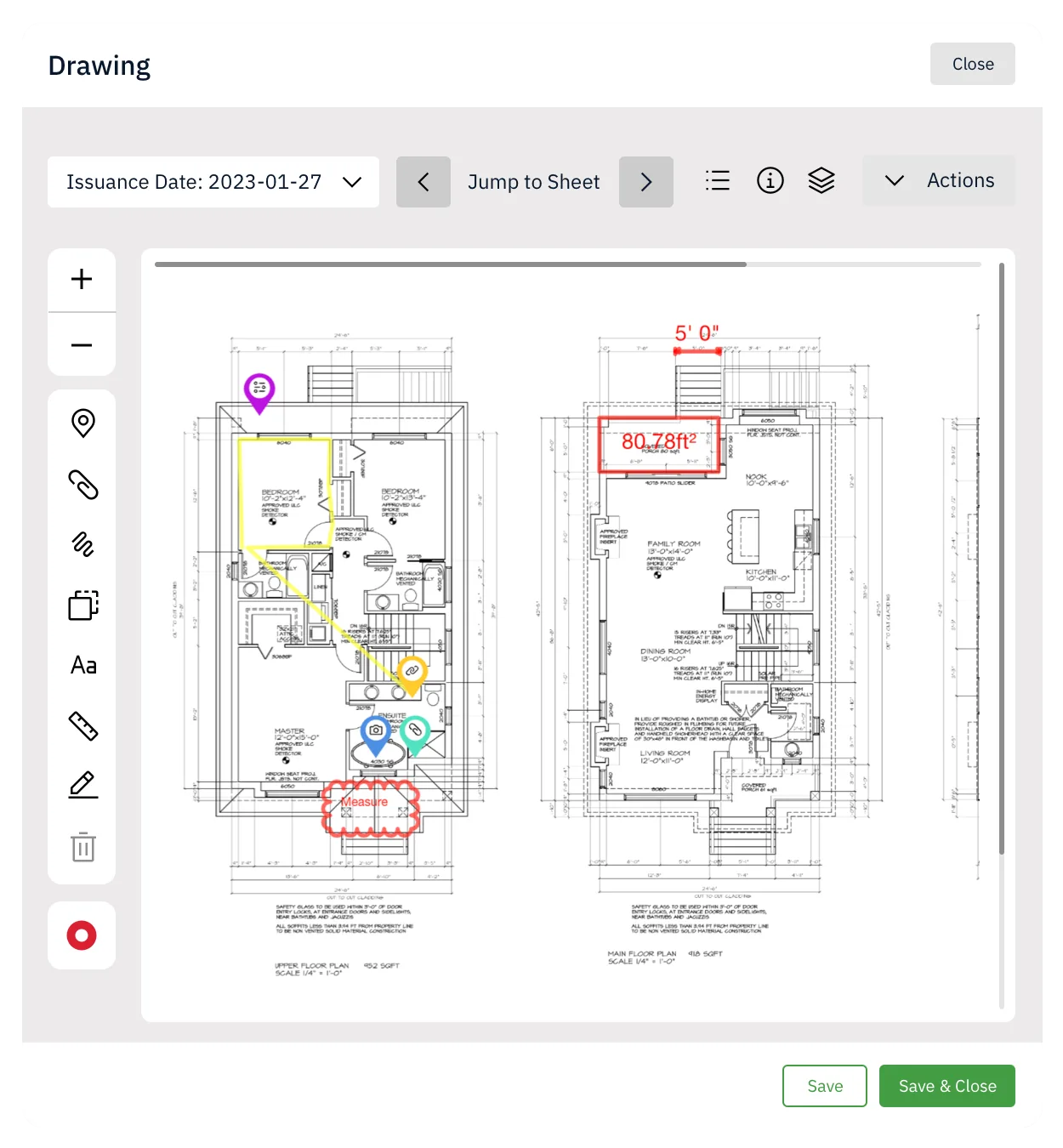
Upload the set once and SiteMax separates the sheets automatically. Crews open the current revision on any phone or tablet, and RFIs, photos and punch items sit on the sheet exactly where they happened.
- Automatic sheet separation and version history
- Markups, measurements and pinned locations
- RFIs, photos and punch items linked to the sheet
- Starred sheets, tags and fast search across the set

Construction Project Tracking Software for Every Jobsite
Track progress, people, paperwork and costs across every project in one place. Choose a module to see how it works.
Field management
Construction Daily Reports App
Capture work logs, photos and manpower in customizable templates, with hourly site weather pulled in automatically.
Explore daily reports →Construction Safety & Compliance Software
Run mobile inspections, toolbox talks, hazard assessments and incident reports; track certifications.
See safety tools →Construction Time Tracking Software
Capture field hours on any device and approve in the office to simplify payroll.
See timecards →Construction Photo Management
Organize photos by project stage or drawing location on the live dashboard.
See photo management →Tool & Equipment Tracking
QR codes, inspection checklists and maintenance reminders across all projects.
Track equipment →Project management
Construction Scheduling
Critical-path scheduling with Gantt, list, calendar and board views, and look-aheads for the crew.
See scheduling →Construction Drawing & Plan Management
Automatic sheet separation, with RFIs, photos and punch items linked to each sheet.
Manage plans →
Construction Punch List Software
Create punch items from photos, assign them and view them by plan location.
Build punch lists →RFI Management Software
Track due dates, status, urgency and correspondence; export RFI logs.
Manage RFIs →
Construction Submittal Management
Request shop drawings early and keep vendors on one approval workflow.
Track submittals →Construction Purchase Orders
Create digital POs in the field and track job costs in real time.
Create POs →Construction Job Costing
Tie labor, equipment, materials and purchase orders to your cost codes as the work happens.
See job costing →Construction Budget Software
Track budgets, committed costs and actuals in real time, by cost type and budget group.
Track budgets →Company management
Construction Team Management
Tiered permissions, crew assignments and safety records for every team member.
Manage teams →Construction Task Management
Phase-based tasks with assignments, subtasks and attachments.
Manage tasks →
Construction Document Management
One place for files, reports and inspections, with offline viewing.
Manage documents →Forms, Reporting & Analytics
Filter by date, project, user and type; export site and safety reports for audits.
View reporting →Critical-Path Scheduling, Built Into SiteMax
A real critical-path engine lives inside the platform your crews already use. Drag one bar and the whole job recalculates: dates, float and the critical path.
- Gantt, list, calendar and task-board views of one plan
- All four link types, with lead and lag in working days
- Look-aheads the crew works from, published as frozen copies
- Import from Microsoft Project XML, export to PDF and Excel


How SiteMax Manages a Construction Project From Field to Office
Capture in the field
Crews log daily reports, hours, photos and inspections on any device.
Track in real time
The project dashboard shows progress, issues, RFIs, submittals and punch items.
Report and approve
Managers approve timecards, export site and safety reports and share with stakeholders.

Construction Company Management Software for Teams, Tasks and Documents
Give every role the right access and a clear view of the work, from superintendents on site to owners in the office.
Team management
Control who sees and does what with tiered permissions. Assign people to the right crews and jobsites, and monitor safety records and certifications.
Task management
Organize tasks by phase, assign them with notes and attachments, and plan with a look-ahead schedule.
Document management
Store project files securely with permission-based access. Link documents to drawings, tasks and punch items.
Reports and analytics
Review field reports from every project, past and present, and export documentation for regulatory audits.
See Every Project Budget Against Committed and Actual Costs
Labor, equipment, materials and purchase orders are coded in the field and land against the budget as they happen, so overruns show up while there is still time to act.
- Revised budget, committed, actual and remaining on one dashboard
- Budget over time, by cost type and budget group
- Purchase orders count as committed the moment they are issued


Replace Separate Apps and Spreadsheets With One Platform
| What you use today | SiteMax module | Result |
|---|---|---|
| Daily reporting app | Daily Reports | Real-time progress with photos, work logs and site weather |
| Paper forms or safety app | Safety & Compliance | Mobile inspections, certifications, incident reports |
| Spreadsheets or timecard app | Timecards | Field hours captured, office approval |
| Cloud storage and photo app | Photos & Documents | Photos tied to stages and drawing locations |
| Tool spreadsheets | Tools & Equipment | QR scanning, inspections, maintenance reminders |
| Email threads and paper POs | RFIs, Submittals, POs | Tracked status, due dates and job costs |
One Form on Site. Every Record Updated. Reports Sent.
VectorFlow lets you build forms and workflows around the way your company already works. Fill one in on site and the data flows into every part of SiteMax that needs it, then the reports send themselves.
Capture it once
A form built for your process, preloaded with project data.
Every record updates
One submission feeds the right modules. No re-entry.
 TimecardsCrew hours
 SafetyInspection record
 EquipmentHours and checks
 PhotosSite photos
 TasksProgress updated
Reports send themselves
The finished record or a summary, to the right people.
- Daily site summaryTo: Owner · 6:00 PM dailyPDF
- Safety reportTo: Safety officer · on submitPDF
- Crew hoursTo: Payroll · FridaysXLSX

Bespoke workflows
Built around how you already work. Start from a Best Practices flow or build your own, and every form arrives preloaded with your project data.
Forms that talk to each other
One submission updates timecards, safety records, equipment logs, photos and tasks, so nobody types the same thing twice.
Automated reporting
Finished records and tailored summaries email themselves to owners, supervisors and the office, on the schedule you set.

 ChatGPT
Your Jobsite,
Inside Claude and ChatGPT.
SiteMax connects directly to Claude and ChatGPT through a native MCP server with more than 600 read and write tools. Every permission, role and restriction you've set in SiteMax carries through. If you can do it in SiteMax, you can do it in your AI assistant. Nothing more. Nothing less.


 ChatGPT+
 SiteMax

One Source.
Clean Data.
Vector doesn't capture freehand text. It references your organization's pre-configured lists. Cost codes, people, phases, and locations tagged in the field trace back to one verified, consistent source of truth. No typos. No duplicates. No guesswork.
 Cost Codes
 Phases
 Divisions
 People
 Tags
 Titles
 Equipment
 Materials
 Contacts
 Locations
Construction Management Software for Contractors of Every Size
General contractors and builders
For teams of 5 to 1,000. Coordinate teams, prevent miscommunication and avoid the cost of big enterprise suites.
Specialty and trade contractors
For teams of 5 to 100. Manage labor coordination, material ordering and progress tracking in one place.
Self-performing teams
Lightweight tools, jobsite visibility and accountability for key stakeholders, at any team size.
Trusted by Those
Who Build.


saved on every payroll run
"This platform has saved us 2.5 hours of processing time each time we process timecards to payroll." Anderson Mazuchelli, Pacific Earthworks
Recognized by users on G2

Get Started With Construction Management Software in Days
Immediate access
Start using user-friendly tools right away and see results from the field the same day.
Dedicated onboarding
An onboarding specialist brings your team up to speed and manages the transition.
Award-winning support
Reach our team by email, phone or live chat when it matters most.
Construction Management Software FAQ
What is construction management software?
Construction management software is a platform contractors use to plan, track and document projects from the office and the field. It replaces paper forms, spreadsheets and separate apps with one system for daily reports, safety, timecards, drawings, RFIs and punch lists. Crews enter information on their phones, and managers see it in real time.
What does SiteMax do?
SiteMax runs the build, from the first day on site to handover. It combines site management, such as daily reports, safety, timekeeping, equipment and photos, with project management, such as scheduling, budgets, drawings, RFIs, submittals and purchase orders. Crews use the iOS and Android apps on site, even offline, and the office works from the same live records.
How does construction project tracking software help?
Project tracking software cuts paperwork and gives everyone the same information at the same time. Field crews submit reports, photos and hours from their phones, so the office never waits for paper or re-enters data. Managers see progress, open RFIs and punch items as they change, and can export records for clients and audits.
Is SiteMax suitable for small and mid-size contractors?
Yes. SiteMax is built for teams of 5 to 1,000, including specialty contractors and self-performing teams. The Starter plan is priced per user with no minimums, so a small team can start with the modules it needs. Teams that need the full construction lifecycle can move to the Professional plan as they grow.
Can I use SiteMax in the US and Canada?
Yes. SiteMax is based in Vancouver, British Columbia, and works with contractors across the United States and Canada. US teams can document work against OSHA requirements, and Canadian teams can keep records for provincial occupational health and safety rules.
Does SiteMax include estimating or takeoffs?
No. SiteMax focuses on the build rather than preconstruction. Most contractors keep their estimating and takeoff tools for bidding, then run the job in SiteMax once it starts, with budgets, cost codes, schedules and field reporting in one place. Processed time entries push to QuickBooks Online, and reports export for your accounting team.
How much does SiteMax cost and how fast can we start?
The Starter plan is $25 per user per month, billed monthly with no minimum, or less when billed yearly. The Professional plan is priced to your team size, modules and workflow. You get immediate platform access, a dedicated onboarding specialist and support by email, phone or live chat, so most teams are running within days.
See How SiteMax Runs Your Next Project
Book a demo and see construction project management software built for the jobsite.
Book a Demo